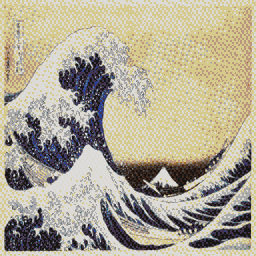
Great Wave: detail at 2×2
Blue Noise retains the print’s fine lines without turning the pale sky into a regular pattern.
 MAPKLUSSMINECRAFT MAP ART WORKSHOP
Export
If you need a `.litematic` for Litematica, MapKluss can generate the schematic directly from your map art result. It is a cleaner workflow than manually rebuilding from a plain image converter.
Schematic export matters most for survival builders and server projects because it turns the result into a buildable output instead of just a nice preview.
Blue Noise retains the print’s fine lines without turning the pale sky into a regular pattern.
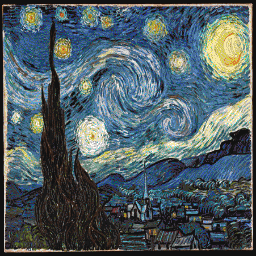
3D Stair with Stucki preserves the brushwork’s motion and expands the blue and yellow range.
2D is simpler and cheaper to build. 3D staircase gives you more shades but demands more attention to height and supports.
Yes. MapKluss supports larger map grids and ZIP export split into individual 128×128 sections.
For `.litematic` export, yes, if you want to use the schematic in-game. The same project can also be used for materials, PNG, or MAP.DAT workflows.